Posts

Showing posts with the label WorldWind

Checkout of the Asus Transformer Tablet
Image
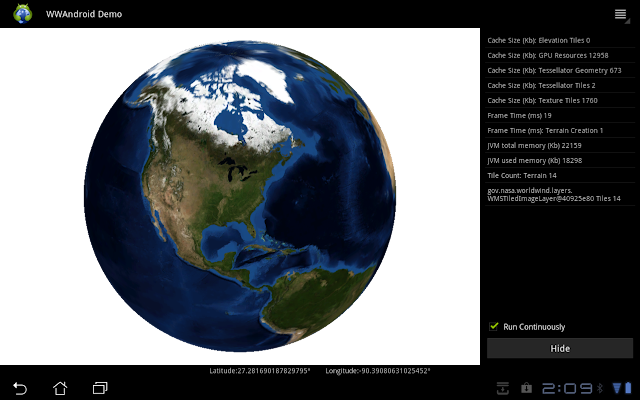
This is a simple smoke test to see if several technology bits I'm interested in would work with the Asus Transformer and its Android load, v3.2.1 (Honeycomb). Those technology bits are Nasa's WorldWind SDK and the late-model Wiimote with built-in Wii MotionPlus. Getting Nasa's WorldWind running on the Asus was extremely simple. The downloadable bundle comes with pre-built APK's in the examples/WWAndroidDemo folder (WWAndroidDemo.apk). All you have to do with the Transformer is plug it into your Android ready developer system and side-load the APK onto the device. In this case all my work was done on my Fedora 14 system. The README.txt file in the root folder has all the directions for loading the apk file. I chose load WWAndroidDemo, so I simply ran: adb -d install examples/WWAndroidDemo/WWAndroidDemo.apk, then ran the WWAndroid Demo under Apps. Easy-peasey. This was the simplest way to test this lashup before investing any significant time and energy, and I was ve...

Tinkering with Nasa's WorldWind on Fedora 14

Image
I've been wanting to drop the Nasa WorldWind SDK on my notebook so I can explore it a bit more on my own time. My notebook is a bit more unconventional than the lab systems. I keep the lab systems as close to standard as possible to minimize any installation or runtime issues. My notebook is more of a personal sandbox, a personal spot to tinker. Up to this point everything's been run on Windows and 32-bit Linux. But this installation of Fedora 14 is 64-bit, and it introduced a few little quirks that had to be settled. Nothing major, but they need to be documented in one spot. First is an SDK ant build quirk. I want to be able to run ant in the SDK folder if necessary from the command line and have the SDK re-build. When I tried a build right after unpacking the SDK I got a log of  "unmappable character for encoding UTF8" error message because somebody decided to include the degree symbol as part of a comment, and Java 6u29's javac decided it didn't like ...

At Work with Linux: Looking Around OpenSUSE 12.1

Image
OpenSUSE 12.1 64-bit with Marble Virtual Globe 1.2.2 One reason OpenSUSE is installed is as a platform for Marble Virtual Globe. Marble comes fully installed with OpenSUSE 12.1. I've been working to have it interpret Google Earth KML that another application in the lab generates so that Marble can be an alternative to Google Earth (but not replace Google Earth). Google Earth, Nasa's World Wind , and Marble Virtual Globe are the three primary earth visualization tools we are interested in. In addition I finally installed Google Chrome on this system. That turned out to be more of a trial than I was expecting. It started when I downloaded the Google Chrome RPM for Fedora/OpenSUSE. I tried to install the RPM immediately after I downloaded it, but installation failed because OpenSUSE 12.1 wasn't LSB 4 or later compliant. I then turned to the repositories. From the repositories you can either install Chromium or Chrome. Chromium stands at beta version 17, while stable C...

The problems with ATI graphics and Ubuntu 7.10

Image
I've had a Sapphire ATI X1950 Pro video card for over 30 days now, and it's crossed my mind more than once to send it back to Newegg and get an nVidia replacement. The greatest annoyance with ATI are the drivers, and considering that this graphics chip (R570) and the card itself have been on the market for over a year, there is essentially no excuse for the continuing problems trying to get the card to do its best either under Windows XP or Linux. That's not to say the card is particularly bad. When it works it works beautifully. But getting it to work is a royal PITA. Trying to get it to work under Linux, either openSUSE 10.3 or Ubuntu 7.10, only adds insult to injury. I finally got the latest Linux ATI driver (8.42.3) installed, built and running by following (for the most part) specific Gutsy instructions on the Unofficial ATI Linux Driver Wiki. I'd like to make one thing perfectly clear. Do not, I repeat, do not install the default ATI drivers via the restricted ...

openSUSE 10.3 RC1: Issues with Compiz and XGL

Image
I've been trying to get Compiz effects enabled, and so I installed all the Compiz bits available via YaST. To make a long story short the effects, while enabled, were less than desirable. The longer I attempt to work with Compiz (and now Compiz Fusion) the more I've come to hold it in the same low esteem as I hold Vista's Aero interface. There's also one other direct effect I have no use for. XGL interferes with my other OpenGL work on this platform. After unistalling the compiz packages via YaST (because the tool to turn it off was broken), I attempted to get back to work with my WorldWInd/NetBeans project. I ran it for a test, and discovered that the WorldWindGLCanvas would not render the map. It would render the test and the compass rose, but not the underlying map. So I brought YaST up one more time, searched for opengl-based packages, and discovered that xgl was still installed. Once I uninstalled xgl and restarted the system to make sure everything was flushed, I ...

openSUSE 10.3 RC1: ATI drivers installed

Image
I finally installed the latest ATI drivers on openSUSE 10.3. I generally followed the core directions normally given for installing under openSUSE 10.2, and had no problems. I'm going to document the fast way I did this. Download the ATI binary drivers and put them in a working directory. It doesn't matter where. Open a shell Change to the working directory where you stored the downloaded drivers. Run the download as follows: bash ati-driver-installer-8.40.4-x86.x86_64.run --buildpkg SuSE/SUSE102-IA32 There is no SUSE103-IA32. Don't be concerned with using 10.2. And note that this is all one line. Change directory to /usr/src/packages/RPMS/i386 Type 'rpm -hiv fglrx_7_1_0_SUSE102-8.40.4-1.i386.rpm' Type 'aticonfig --initial' Reboot Once rebooted and logged back in you might want to run the following command inside a shell. wbeebe@europa:~$ fglrxinfo display: :0.0 screen: 0 OpenGL vendor string: ATI Technologies Inc. OpenGL renderer string: RADEON 9700 PRO ...

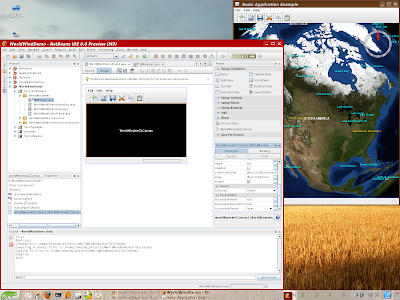
Playing with Nasa's Java WorldWind on Suse

Image
Geertjan has a really good first article on using Nasa's latest Java WorldWind client software wrapped up in a NetBean's project. Note that the client is a preview, but it's still quite usable to get started with. Geertjan looks to have used NetBeans 5.5. My project uses the following tools and environment: NetBeans 6 Milestone 9 Java 1.6.0 Update 1 Suse 10.2 Latest ATI drivers (8.35.5 or later) When I created my project I elected to start with the Java Desktop Application (New Project > General > Java Desktop Application). Most of what Geertjan specifies that you do is still correct under NB9, but there are some subtle differences which are easy to figure out. There is one (minor) issue to be aware of. When you want to drag and drop the WorldWindGLCanvas Bean onto the DemoFrame, you need to delete the central canvas that's already there. Once deleted, you then drag the WorldWind bean into its place. This looks to be a really interesting tutorial series.