Posts

Showing posts with the label Eclipse

android development on windows 8, step 2

Image
I started the month of May off with a simple post about developing for Android on Windows 8. I'd made a Big Promise to do a lot more than I've actually wound up doing. It's not that I've given up, it's that an awful lot has happened over the last 31 days. I did do some more development, less than I certainly anticipated, but I've not completely stopped. I'm just going at a slower rate than I anticipated. One of the better ways to dive and and get to know any complex software system is to take code previously written against an older version of an application and port it to the latest release of a compiler, software framework, operating system, or other complex software environment. Every complex system provides code examples to illustrate features and capabilities and to act as a starting point for other developers. And every example is always written against the earliest release, and more often than not, is never revisited and brought up to date against...

At Work With Linux: Digging Into Ubuntu 11.10

Image
Running synaptic from Dash. Note that I've also dropped the synaptic icon on the left vertical launcher. I received a couple of questions from Rick Reumann via a comment on the post " At Work With Linux - Ubuntu 11.10, Day 2 ". His questions are at the bottom of the page and boiled down to how to setup synaptic as the default installer such that double clicking on a .deb file starts it up, and how to start synaptic from Dash and hopefully from the launcher. Starting with the second question I was able to start synaptic from Dash, and I was able to drag and drop the icon to the launcher such that clicking on the synaptic icon launched it. So that part did work for me. Unfortunately, I have no answers for the rest of his questions. You can't create individual application launchers on the desktop, and you can't create them on the fly on the launcher bar. I did discover while installing the NetBeans IDE 7.1 RC2 downloaded from Oracle that you could programmati...

Netbeans 6.7 Milestone 3 released

Image
It's been a while since I commented on either the Eclipse or Netbeans IDE. Depending on the project, I've been using both. As I've noted in the past both are of very good quality, so it's a matter of personal taste as well very specific requirements which one you select for a given job. The Netbeans project is currently working on its next release, version 6.7. Milestone 3 was just released, and you should take a quick look at it's " New and Noteworthy " section (along with New and Noteworthy from milestones 1 and 2 ). Of particular interest is the dependency graph in Maven support. I'm reminded of Doxygen and the graphical support in Together (now owned by Borland). Doxygen and Together are for software engineering as apposed to project management and control with Maven, but the core needs are the same. I could see myself working on extending UML support and round-trip engineering with dependency viewing just like in Doxygen (assuming it hasn't be...

Updates

I've gone through a series of notable hardware and software updates so far this year, and it's barely February. In no particular order: Dell D630 Memory Update I upgraded the D630 from 2GB to 4GB (2 x 2GB sticks) for a mere $70 total from Dell itself. This was for the company notebook. By the time Windows is up and running I can only 'see' 3.5GB, but it's worth it, and if I need all that memory I can swap around my hard drives and run Fedora 10. I run Widows XP SP3 primarily. Windows applications include Google Chrome, Google Earth, Visual Studio 2008, NetBeans IDE (6.5 and 7.0M1), Eclipse (3.4.1 and 3.5M5), as well as Office 2007 and Visio 2007 professional. And then there are other project-specific applications (EventStudio System Designer, for example) and testing applications before deploying. It's not unusual for me to hit 1.5GB with everything up in a normal day-to-day workflow, and I was not happy to hit swap on this notebook. So I bumped up memory and ev...

Notes from the field: Fedora 10 and OpenSUSE 11.1 RC1

Over the weekend I had the opportunity to install Fedora 10 on a Dell Latitude D630 notebook and to tweak the OpenSUSE 11.1 installation on europa. Fedora 10 Fedora 10 was installed on a spare 120GB hard drive. It was installed over Fedora 9, which I had managed to configure into a reasonable working state and had used for about five months. But it wasn't perfect. While I was able to install the Nvidia driver and enable 3D hardware acceleration, sound and wireless did not work. With Fedora 10 I now have sound, but the wireless still doesn't work. Even though I installed both Fedora 9 and 10 from DVD, I only installed the Gnome desktop under Fedora 9. With Fedora 10 I installed the Gnome, KDE, and Xfce desktops. After the installation I was only able to select between Gnome and KDE, although I could see the Xfce tools (such as Thunar ) on the Gnome menus. Both Gnome and KDE worked fine until I installed the Nvidia drivers for Fedora 10 ( kmod-nvidia ). After installation the Gno...

I, for one, welcome our new Android overlord

Image
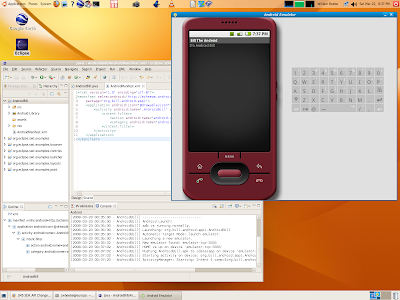
It's been a while since I played with Google's Android SDK (and I do mean play), so after after it surfaced recently in the tech press I decided to crank it back up and see what was different. So I downloaded the latest Eclipse release (3.3.2) and the latest Android SDK (M5 RC15), installed everything, and fired Eclipse IDE back up again. First, before you can use the SDK in the IDE you have to install the Eclipse Android plugins, which are at https://dl-ssl.google.com/android/eclipse. If you've worked any with Eclipse then you know you have to add the https address as a new remote site, then install all plugins found there. One of the two sets of plugins, the editors, requires the Eclipse WTP (Web Tools Platform) plugins as well, so when you go to install new features select the Google Android site as well as teh Europa Discovery Site. When you select both the Google entries the editors selection will have an error indicator. Click WTP. then the "Select Required...

Postcard from the edge

Image
This past Thanksgiving has been ... unique. I've spent a lot less time doing what I planned because of its uniqueness. Regardless, I managed to tinker a bit with some of the latest offerings. NetBeans 6 RC2 RC2 was released right before Thanksgiving. I've got it installed on Windows XP 2 (algol) and Ubuntu 7.10 (europa, shown below). On algol, with its 2GHz Core Duo processor, RC2 runs smooth as silk. It should considering the processing horsepower. On europa, with its single-core 2GHz Athlon XP, it runs a little rougher, especially at startup. To make the NetBeaners feel a little better, Eclipse 3.3.1.1 has the same problem on europa (see below). It takes about 20 seconds after the main window has appeared for responsiveness to be useful. And this only occurs the first time you start it up. Of course, for many people such as myself, you start it and leave it running for long periods lasting days at a time. Regardless of the initial startup lethargy, RC2 shows considerable poli...

NetBeans 6RC1 has serious performance issues on Ubuntu 7.10

Image
I've been running Ubuntu 7.10 on europa, with basic 3D hardware acceleration via the native ATI drivers and some of the eye candy turned on. I have been pleased with just about everything except where noted. I decided to install the latest NetBeans 6 release, RC1. I downloaded it and installed it, and then fired 'er up. The first thing I noticed was the performance. It is, in a word, abysmal. It starts up slow and it runs slow. And I do mean slow. Up to this point developer releases of NetBeans 6 have not had such drastic performance slowdowns. And this performance slowdown is only observable on Ubuntu 7.10. NetBeans 6RC1 runs just fine on Windows XP SP2. The problem presented an interesting opportunity to compare NetBeans 6 RC1 with the version available on Ubuntu via Synaptic, NetBeans 5.5.1. Using Synaptic I found and installed that (current) version of NetBeans and started it up. The screen shot shows both running on the desktop. Version 6 RC1 is on top and version 5.5.1 i...

openSUSE 10.3 RC1: More things are beginning to work

Image
As noted in earlier posts about using Java 6 Update 2 on openSUSE 10.3 with graphical applications, such as NetBeans , I've since discovered a second solution to the Java 6 problem. Use Java 6 Update 1 as provided via the restricted formats page . I've already documented how I did it (in two steps, naturally, instead of one). I should have checked to see if Java 6 U1 as provided by the community would have the same problem as Java 6 U2 downloaded from the Sun site, but I didn't. I automatically assumed that if Java 6 U2 had a problem, then so would the slightly older U1. If there is no pressing bug fixed in U2 that you have to have, then my advice would be to install U1 and to work with it. That keeps you from having to add the environment hack in order to get applications such as NetBeans 6 Beta 1 working. Update I have Eclipse 3.3 installed on this system as well as NetBeans, and Eclipse 3.3 runs as well with Java 6 Update 1 or Update 2. I believe this is possible beca...

NetBeans and Eclipse release new milestones

Image
Friday was an interesting day. NetBeans released NetBeans 6 Milestone 9 (NB6M9), and Eclipse released Eclipse 3.3 Milestone 7 (E3.3M7). It should be noted that NB6M9 is now considered a general preview release, just in time for Java One. I downloaded and installed both. The changes provided in NB6M9 are somewhat more significant than in E3.3M7. What follows are some notes and impressions from initially installing NB6M9. There are now three packages (or bundles) for NB6; Basic, Standard, and Full. With Basic you get just the IDE (Java SE development, GUI Builder, and the Profiler). With Full you get Basic plus JavaEE, Mobility, UML, SOA, Ruby, and Sun's Application Server. This is a fundamental change (and a break) with earlier versions, where you downloaded the equivalent of Basic and then used the Update Center (Tools | Update Center) to pick up other functionality, such as UML or Ruby support, or you went to one of the supporting projects and downloaded that package (such as ...

Ruby development support advancing in NetBeans 6

Image
As an outsider looking in it's difficult to determine when the time is right to try out new bleeding-edge NetBeans features. One new feature being developed for for NetBeans 6 is Ruby and Rails support. It doesn't come bundled with the latest milestone release (7). Instead you have to download it from the Update Center. The Update Center modules are in a folder labeled 'Ruby'. With the Ruby modules NetBeans acquires the tools to create Ruby projects as well as create Rails projects that run on top of the Ruby tools. Unlike Eclipse's Ruby support , NetBeans uses JRuby entirely. There might be arguments as to which is better, but having tried both I see no advantage of one over the other. If there is any kind of advantage then it would be with NetBeans, since it can be installed and run without an external Ruby installation. But I can't imagine a Ruby developer not having a Ruby installation. Nor could I imagine a developer choosing JRuby over standard Ruby. JRu...

Starting comparison of IDEs

Image
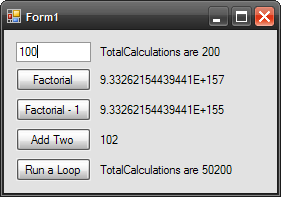
Booting Knoppix allowed me to play with a number of applications bundled with the distribution. One of them was MonoDevelop, the Mono C# IDE. I was intrigued with the prospect of being able to create cross-platform applications in C# that could be developed equally on Linux using MonoDevelop as well as on Windows using Visual Studio 2005. What I discovered is that MonoDevelop is a simplistic development IDE at best. If you want a powerful IDE under C#, then it's best to stick with Visual Studio under Windows. For other languages, such as Java, there are alternatives to powerful and complete cross-platform editing. I started this simple experiment under Windows XP on my notebook with VS2005. I wanted to create a complete project with solution file that I could then attempt to open under MonoDevelop running on Linux. I followed a Microsoft walk-through (similar to a Java trail) that allowed me to create a very simple C# application with a single window and some controls. You see it ...

Former Eclipse user re-evaluates Eclipse 3.3M5

Image
I've been using NetBeans for a while now, starting with version 4.2 in beta. One of NetBeans' key selling points (in my not-so-humble-opinion) is Java GUI building with Matisse . That feature continues to be quite powerful and unrivaled, especially for a free-as-in-beer IDE. I even wrote a lovely paean to the wonders of NetBeans and why I moved away away from Eclipse to NetBeans . Now, it looks like I may have to eat some of those tastefully written words. What you're looking at above is a complete Ruby on Rails project hosted and running within Eclipse 3.3 Milestone 5 on Windows XP. Milestone 5 was released this past Friday, February 9th. I installed it Saturday, and then went on a plugin hunt to fill out additional features and capabilities. Why did I decide to re-install Eclipse, especially a milestone? So that I could get a complete integrated development and test capability in one convenient package for Ruby on Rails. Like a lot of other folks I've been playing ...

Suse 10.2, part 3: Looking at KDE

Image
This post comes at the convergence of a number of events. First, there was the story on OSNews titled " Has the Desktop Linux Bubble Burst? " That generated a number of responses , one of them from Aaron J. Seigo . With all the drama buzzing in the background, I went back to my Suse 10.2 installation and started to look at the KDE desktop. When I installed 10.2 I installed both Gnome and KDE with an eye towards really testing and comparing both. I've slowly grown dissatisfied with Gnome over the past year, and I'm ready for a real change. I've played with KDE in the past, and I've started to use the underlying GUI toolkit, Qt from Trolltech . I've wondered if I should switch and use KDE as my default desktop. With Suse 10.2 it looks like the answer is yes. With both environments installed it was a simple matter to log in using KDE. The first thing I did to my KDE desktop was to change the blue background into something, anything, a little livelier. I like ...

Eclipse 3.2 M5 due Feb 17

Image
Eclipse 3.2 M5 is now in the final stretch before its scheduled release on Friday, February 17th. Here is a list of bugs to be fixed for 3.2 M5. I have no idea what new features may be delivered for this specific drop.

Dr. Dobbs Writes About Eclipse and Netbeans

The August issue of Dr. Dobbs carries an article about Eclipse and NetBeans titled " NetBeans 4.1 & Eclipse 3.1 " by Eric J. Bruno. The article is a good, if high-level, comparison between the two. Eric is apparently an Eclipse user, as he admits that I first used NetBeans for Java development about two years ago and wasn't entirely comfortable with it. Consequently, I began to use Eclipse. With it, I could develop and debug Java code within a full-featured IDE that didn't feel clunky. That was pretty much my first reaction to using NetBeans prior to version 4. I've been a user of Eclipse essentially since version 2. The article starts by introducing the reader to overviews of NetBeans 4.1 and Eclipse 3.1. The author then compares and contrasts how both IDEs support J2SE development, J2EE development and J2ME development. The author's conclusion is pretty much dead on with mine at this point in time: Comparing IDEs such as Eclipse and NetBeans is similar t...

Working with Eclipse 3.1

In a prior post, " Working with Netbeans 4.2 Dev - Part 1 ", I make the following comment at the end of the post: While the alignment lines are good, I have to wonder what is wrong with the Visual Basic-style of control layout using a grid on the form... What's wrong with Netbeans (or Eclipse, for that matter) using the same style of layout? Well, it turns out that the new Visual Editor (1.1) for Eclipse does support this ability. There is a tutorial on the Eclipse website (Flash) that goes through an entire process of using the Visual Editor to create a reasonably non-trivial SWT panel in a Rich Client Platform (RCP) application. That's right. You get two for the price of one with this tutorial - you learn about many of the features of the Visual Editor and you get to see how to add a view to an RCP application. I personally believe that with the release of Eclipse 3.1 that the Eclipse platform has not only maintained it's lead over Netbeans 4.1, but has actuall...

Found: Solution to Eclipse Plugin Failure

In a previous article, " Eclipse Annoyance - Failures with Plugin Development using Eclipse 3.1 ", I documented a problem with starting up a plugin project (any plugin project) with the first two release candidates of Eclipse 3.1. It turns out that moving from milestone 7 (M7) to the first release candidate (RC1) changed the internals a bit. One of the new features of Eclipse 3.1 is that when you update Eclipse you no longer blow away your settings. You workspace is now seperate from your Eclipse installation. For Windows and Linux your workspace by default is placed in your login or home area. Eclipse 3.1 keeps the metadata that defines everything in your environment separate from Eclipse proper itself and in this workspace. This has been great for all the milestones in Eclipse 3.1 I've tested, because it was so simple to just delete the older Eclipse installation and unpack (unzip) the new Eclipse. I could then start it up and carry on. That was great as long as nothing...