Posts

Showing posts with the label RHEL

state of my linux

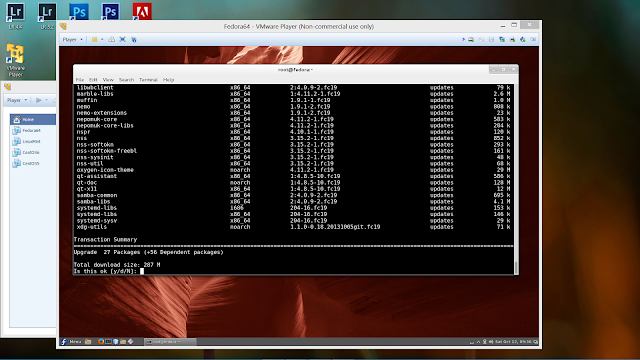
Image
Fedora 19 virtualized on my Windows 8 desktop It's been a while since I commented about Linux. I've been very busy with my career changes as well as learning a new set of skills associated with that career change, including some travel. My use of Linux has settled down as a super-application that runs on top of my Windows 8 system (running on the Samsung Series 7 Chronos). I have four distributions installed these days; Fedora 19, Linux Mint 15, CentOS 5 and CentOS 6. The CentOS installations are there primarily as my final testing sandboxes for RHEL 5 and 6, respectively. Otherwise I do my leading testing and development on Mint and Fedora, usually in that order. Here's a quick rundown of my experiences and observations to date running Linux in this way. Linux Mint 15 . By far and away the cleanest and easiest to work with. Its gcc and clang/llvm installations aren't up-to-date with the latest and greatest as the versions installed on Fedora, so if I really ...

At Work with Linux: openSUSE 11.4, VirtualBox 3.2.12, RHEL 6

Image
openSUSE 11.4 was released 10 March. The last action I started before heading home the following weekend was to start downloading the DVD ISO. When I came back to work the following Monday I burned it to DVD and installed it under VirtualBox 3.2.12. openSUSE 11.4 running in VirtualBox, hosted by RHEL 6 SuSE, among all other Linux distributions, holds a special place in my heart. I'm not going to write a "10 reasons" screed about it, but I will admit having a strong bias towards it, warts and all. With everything else going on right now I had barely enough time to install an instance under VirtualBox and fire it up just to kick the tires. The very first feature I noticed: openSUSE 11.4 installed out of the box fully operable with VirtualBox. I didn't have to install VirtualBox's Guest Additions. And that's going to be very helpful going forwared with openSUSE 11.4, especially when openSUSE updates come out for the kernel. Every other Linux distribution ...

At Work with Linux: Chrome 10 on RHEL 6

Image
The latest Chrome updates came rattling down the Internets and landed on my RHEL 6 systems today. And, as usual, I decided to throw a test sample or two its way to see how Chrome 10 handled them. For this I went to Google's very own Chrome Experiments page. I wasn't trying to be particularly sneaky or mean spirited. I picked the "Sintel Goes Boom" WebGL experiment because it was the first on the page (well, top upper left corner for those cultures that read left-to-right, top-to-bottom). And sure enough, Sintel did indeed go boom. Along with the sandboxed page. I even got a nice crash warning on the Gnome desktop. Chrome 10 still has issues running WebGL on RHEL 6 Which, in the Universe's Grand Scheme, is not that big a deal. If nothing else I verified, once again, that crashing in Chrome's sandbox does not crash Chrome. For those of you curious as to the details of what happened, here's what RHEL 6 reported. And the WebGL-generated crash repo...

At Work with Linux: Automatic Logins

Password login in a lab setting can be onerous, especially when dealing with lots virtual machines. This simple change to custom.conf under /etc/ gdm will automatically log a Linux-based virtual machine into a given login account. Automatic login is one of those small but important features that make working with a system more efficient and pleasant. On a virtual machine, it in essence turns a Linux VM into a meta application. This, of course, is reasonable in a locked-down lab setting. For systems which are in a less controlled public-facing environment, automatic login may not be the best feature to enable. Linux Automatic Login Enable File Location /etc/gdm File Name custom.conf Changes to Make Under the section labeled [daemon], add the following lines; AutomaticLoginEnable=True AutomaticLogin= username Because this file is under /etc, you'll need root privileges to modify the file. Username , of course, is the user name you want the VM system to default to. And ...

Chrome 9 on Linux

Image
Chrome running on Redhat Enterprise Linux 6 host OS. Chrome is playing back a YouTube video using HTML 5. In the course of my real work, I've had the opportunity to try out various combinations of Linux and Chrome on some of my lab systems, just to see how it all works together. I've installed Chrome on two versions of Linux; RHEL 6 and Fedora 14. Chrome was installed on RHEL 6 using the bog-standard Google-supplied RPM. I originally installed Chrome version 8 in this manner. What I noticed and certainly appreciated about Chrome on RHEL 6 is that Chrome 'inserted' itself into the regular software update structure of RHEL 6. Now, every time a new release is pushed out, the update icon lights up on the panel, and when I click on it, Chrome updates are installed just like they are under Windows. The installation under Fedora 14 is through the regular repositories, and updates come along with all the other Fedora updates. Again, smooth, simple, and clean. Chrome 9 ...

At Work with Linux: RHEL 6 and VirtualBox 3.2.12

Image
A Dell 690 with RHEL 6 as the host OS. Virtual Box 3.2.12 is running Fedora 14  in a virtual machine. It's been a little over two months since I last wrote about using Virtual Box with Redhat Enterprise Linux (RHEL). At that time I was attempting to host a Fedora 14 virtual machine on RHEL 5.4. This time, I upgraded one of the RHEL 5.4 boxes to RHEL 6, and installed Virtual Box 3.2.12 (and before you write to me in the comments, I'm well aware that VB 4 has been released). What you're looking at on the left is a Fedora 14 VM running under Virtual Box 3.2.12 r68302. The host OS is RHEL 6 x86-64. Absolutely everything works, especially USB device sharing between the host and the VM. Under RHEL 5.4, USB device sharing refused to work. I suspect that the older kernel that RHEL 5 was based on would not support that capability. RHEL 6's more up-to-date kernel allows that particular feature to function, and function flawlessly (so far). To date I've installed a...