Posts

Showing posts with the label Chrome

linux at home: running a linux mint 15 virtual machine on windows 8

Image
Windows 8 desktop with task manager and VMware Player booting Linux Mint 15 Back in my last job I got into the habit of installing every Linux distribution when it was newly released. The primary reason was to keep tabs on the evolution of the various distributions. The secondary reason was because VirtualBox, and later VMware Player, forgave a host of sins when trying to install Linux on bare metal, not the least of which was lack of driver support for the latest and greatest peripherals that were evolving at a mad pace on their own. I quickly discovered I had far greater success installing Linux virtually than I ever did directly on a notebook or desktop computer. The icing on the cake was the rapid realization that I didn't have to wipe a drive when I wanted to install a different version of a different distribution. VMs were basically very large disk files, and as long as I had enough disk space (growing from the hundreds of gigs into the single terabytes) I could just crea...

a bit of a changeup

Image
You're looking at a screenshot from my Nexus 7, Google's 7" reference Android tablet. It's a screenshot of my blog with the tablet in its default portrait orientation. I changed my blog's default layout from 'magazine' to 'classic' because 'classic' displays best on the tablet. In magazine mode the blog crammed everything onto the page, regardless of its orientation. It made it very difficult to read and navagate. If you selected a story, it made it very hard to scroll up the story. If I may borrow a phrase and mangle it a bit, magazine layout is very finger unfriendly, while classic isn't. This layout also has the added benefit of showing the blog's navigation bar off to the right. There's just a smidge of irony in this selection of classic, as it was never originally designed for touch in mind, but for an earlier time on the web when simplicity was held in higher regard. I changed up the color a bit from tan to green. It...

Getting Stomped by Little Gnome Feet

Image
Well, I gave it the old college try and tried to create an up-to-date Mono development environment on top of my aging Fedora 14 installation. I should have know better , considering how many times in the past I've beaten myself bloody with some specific feature of Linux. It all started innocently enough. I cloned a copy of Mono from their git repository and built it without any issues. I wrote a number of increasingly complex C# applications to test the compiler and runtime. No problems were encountered. But I noticed I couldn't compile or run any GUI applications. Complimenting that was a lack of MonoDevelop 3 , the Mono/C# development IDE. When I started to dig into how to build and run that particular tool, I ran into problems. Fedora 14, released November 2010, is running Gnome 2.32. Fedora 14 is the last Fedora release to run Gnome 2. Fedora moved to Gnome 3 starting with version 15, and that's one important reason why I stayed with Fedora 14 and continue to stay ...

At Work with Linux: Ubuntu 12.04 Still Around

Image
Yes, I lied. I kept Ubuntu 12.04 around (and 11.10 for that matter) while I went off to do other tasks. Today, after reading a comment from an unknown about enabling 3D acceleration on the VMware Player to correct the Ubuntu 12.04 window resizing problem, I decided to fire up the instances of 11.10 and 12.04 for further examination. First, I upgraded the patches and packages of both versions. Then I enabled 3D acceleration for both. In the case of 11.10, enabling 3D acceleration accomplished nothing. But sure enough, just like unknown wrote, enabling 3D acceleration for 12.04 cleaned up the window resizing, as well as fixing the text artifacts and giving the whole desktop a subtle but significant makeover. What is interesting in 12.04 with 3D acceleration is that the Dash Home panel now covers the entire desktop when selected. I know it didn't do this for Ubuntu 11.10, and I'm not so sure it did this for the non-3D-accelerated 12.04 desktop. I'm neutral as to wheth...

At Work with Linux: Looking Around OpenSUSE 12.1

Image
OpenSUSE 12.1 64-bit with Marble Virtual Globe 1.2.2 One reason OpenSUSE is installed is as a platform for Marble Virtual Globe. Marble comes fully installed with OpenSUSE 12.1. I've been working to have it interpret Google Earth KML that another application in the lab generates so that Marble can be an alternative to Google Earth (but not replace Google Earth). Google Earth, Nasa's World Wind , and Marble Virtual Globe are the three primary earth visualization tools we are interested in. In addition I finally installed Google Chrome on this system. That turned out to be more of a trial than I was expecting. It started when I downloaded the Google Chrome RPM for Fedora/OpenSUSE. I tried to install the RPM immediately after I downloaded it, but installation failed because OpenSUSE 12.1 wasn't LSB 4 or later compliant. I then turned to the repositories. From the repositories you can either install Chromium or Chrome. Chromium stands at beta version 17, while stable C...

At Work with Linux: A Little Further Digging into Ubuntu

Image
Three instances of Google's Chrome on the Unity desktop Those three instances in tile layout after clicking the Chrome icon in the Unity launcher In digging a little further into how Ubuntu 11.10 works, I installed Real Google Chrome. I then used Chrome to create a shortcut to Oracle Java on the desktop (via Wrench | Tools | Create Application Shortcuts), then experimented a bit with the results. If you're not familiar with Google's browser "applications", know that when Google's Chrome creates a shortcut to a web page, on execution (double click the shortcut on the desktop) the shortcut launches Chrome as an application without any of the tabs or other decorations present on the regular Google Chrome browser. For those who are used to multiple tabs in one browser instead of multiple browser instances on the desktop this behavior can be somewhat surprising. Unit's left-side launcher provides nominal visual feedback as to what is going on. In t...

At Work with Linux: Adding Google Chrome to Ubuntu 11.10

Image
Real honest-to-goodness Google Chrome Finally found decent directions for installing Google Chrome here:  http://www.google.com/support/forum/p/Chrome/thread?tid=381d28fd49d3fc52&hl=en I'll repeat the pertenant parts. Perform the following four steps in order: Download the Chrome Debian package to your 'Downloads' directory (or whatever directory Firefox uses for downloads) from http://www.google.com/chrome Open a terminal from Dash or press [Ctrl][Shift][T] Run command: sudo apt-get install libnspr4-0d libnss3-1d libxss1 libcurl3 Run command: sudo dpkg -i './Downloads/google-chrome-stable_current_amd64.deb' Once installed you'll find it via Dash. You can drag-and-drop the Chrome icon to the launcher. Why use Google's Chrome rather than what you'll find via Ubuntu Software Center? Because the version in Ubuntu Software Center is at major revision 14, while Google Chrome's major version (at this point in time) is 15. After installin...

More Lying with Numbers

Not willing to leave well enough alone , I decided to go back to the StatCounter browser statistics and spread the time limit out a bit. Like three years. And here's what I discovered buried in the numbers from August 2008 to September 2011. Source: StatCounter Global Stats - Browser Market Share You don't need a fancy chart to understand the numbers on this graph. From August 2009 to September 2011 (now), Internet Explorer has collapsed in market share by nearly half, from 58% in August 2008 to 33% now. Firefox has essentially remained flat at 35%. The big story is how Chrome rose from nothing to 22%. The rise of Chrome has had a profound influence in Europe, drastically reducing Internet Explorer (and to a smaller extent Opera) while essentially keeping Firefox flat at around 35%. But what's interesting is the far right where it looks like Internet Explorer and Firefox crossed again. Let's go back and look at the chart, using the same start time as our brillia...

Lying with Numbers

Figures often beguile me, particularly when I have the arranging of them myself; in which case the remark attributed to Disraeli would often apply with justice and force: "There are three kinds of lies: lies, damned lies and statistics." Mark Twain's Own Autobiography: The Chapters from the North American Review There's a site on the web hell-bent on vilifying open source projects such as Linux, along with their (at times naive) supporters, for no more good reason than it's great entertainment for the other site participants. No, I'm not talking about Linux Hater's Blog , but that pale imitation of LHB known as the TM Repository and its FUD Tracker section. I tend to go slumming through the FUD Tracker for the lulz. Most of the time I take a quick look and have a small chuckle at the childishly written posts and then move on to more important tasks, such as cleaning out Lucy's litter box. But today I came across a post about how Internet Explorer ha...

At Work with Chrome: Issues with Chrome on Win 2k8 R2 SP1 and Win 7 Force Removal

I have switched three of my six workstations in the lab from RHEL to Windows 2008 R2 SP1. The other three remain as RHEL hosts. The primary reason for switching to Windows was to support Windows virtual machines needing 2D and 3D graphics support. Virtual Box couldn't provide this capability while hosting on RHEL. This need came about from applications that needed Windows support with 2D and 3D graphics acceleration. During the installation of Windows (both server on as host and Windows 7 virtual machines) I installed Chrome as an alternative to Internet Explorer 8. When first installed Chrome worked as expected, especially automatic updates. This continued until Chrome 12. When Chrome 12 tried to update to Chrome 13 I started to receive "Update server not available (error: 7)" messages on the combined about/update dialog. Looking around it appeared that the update downloaded but failed to install. Further looking about gave no clear indication of the problem or a sin...

At Work with Linux: Chrome 12 and Shaun the Sheep on Fedora 14

Image
Google released Chrome 12 yesterday (it came rattling down the tubes onto Fedora 14 before it hit my Windows 7 boxen). There was the usual coverage from the usual suspects ( The Inquirer and Ars Technica , with Ars, as usual, being superior). And there is, thankfully, a page demonstrating one key feature of Chrome 12, GPU accelerated 3D CSS transforms. I love Shaun , having fallen in love with Aardman Studios and Wallace and Gromit years before. I didn't discover Shaun until I watched a number of the episodes on Netflix last year. Love it all. Anyway... The demo uses GPU acceleration, CSS, and all the other goodies under the Chrome hood. All these application captures were made on Fedora 14 using Chrome 12.0.742.91. The Dell Latitude D630 has an nVidia Quadro NVS 135M video card, and the nVidia drivers are installed providing good hardware video acceleration. I was quite pleased when the demo executed without any drama; no crashes, no odd artifacts (as compared with the Win...

At Work with Linux: Chrome and Firefox and Java, oh my!

Image
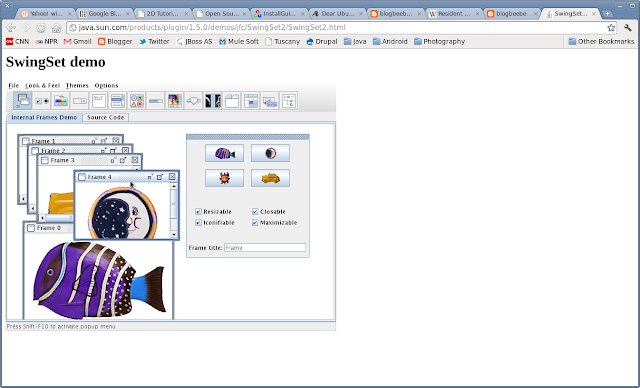
One of the capabilities I need on Fedora 14 64-bit is the ability to execute the Oracle Java 6 plugin (when called for) within Chrome (major version 12 at this point in time) and Firefox 4. Installing Oracle Java 6 installs the plugin, but doesn't enable it for the browsers. In order to enable the Oracle Java 6 plugin for both Chrome and Firefox, the alternatives command needs to be executed after installing Oracle Java 6 (update 26 at this point in time). All of this is done as root. Steps to Enable the Java Plugin for Chrome and Firefox on Fedora 14 x86-64 Step 1 Install Oracle (née Sun) Java 6 (update 26 at this point in time) Step 2 alternatives --install /usr/lib64/mozilla/plugins/libjavaplugin.so libjavaplugin.so.x86_64 /usr/java/default/jre/lib/amd64/libnpjp2.so 1 Step 3 alternatives --config libjavaplugin.so.x86_64 1 Once installed you should type 'about:plugins' in the browser's address bar (Chrome)/location bar (Firefox); the command works for both br...