Posts

Showing posts with the label Java

fedora, the day after

Image
Playing a bit with Fedora 19 after morning chores and before I head out for some late morning errands. The performance of the desktop is reasonable but not blazing fast, which is to be expected on a VM. It's Good Enough for what I want to accomplish, which is functionality. If I need performance and if the application isn't Linux-specific then I'll move it over to Windows 8, shut everything down that isn't necessary, and run it on an OS running on bare silicon. I decided to install Netbeans 7.3.1 on this VM to see how it performs. So far it's usable. In addition to Java support I also installed support for C++ (see why below). I'm also going to install Scala support as well to mirror how I have Netbeans 7.3.1 installed on Windows 8. After further investigation I've discovered that the version of Java being pushed by Fedora 19 is Java 7 update 25, which is the current Oracle release. I may (I say may) uninstall the Oracle version and go with the version...

Tinkering with Nasa's WorldWind on Fedora 14

Image
I've been wanting to drop the Nasa WorldWind SDK on my notebook so I can explore it a bit more on my own time. My notebook is a bit more unconventional than the lab systems. I keep the lab systems as close to standard as possible to minimize any installation or runtime issues. My notebook is more of a personal sandbox, a personal spot to tinker. Up to this point everything's been run on Windows and 32-bit Linux. But this installation of Fedora 14 is 64-bit, and it introduced a few little quirks that had to be settled. Nothing major, but they need to be documented in one spot. First is an SDK ant build quirk. I want to be able to run ant in the SDK folder if necessary from the command line and have the SDK re-build. When I tried a build right after unpacking the SDK I got a log of  "unmappable character for encoding UTF8" error message because somebody decided to include the degree symbol as part of a comment, and Java 6u29's javac decided it didn't like ...

At Work With Linux: Digging Into Ubuntu 11.10

Image
Running synaptic from Dash. Note that I've also dropped the synaptic icon on the left vertical launcher. I received a couple of questions from Rick Reumann via a comment on the post " At Work With Linux - Ubuntu 11.10, Day 2 ". His questions are at the bottom of the page and boiled down to how to setup synaptic as the default installer such that double clicking on a .deb file starts it up, and how to start synaptic from Dash and hopefully from the launcher. Starting with the second question I was able to start synaptic from Dash, and I was able to drag and drop the icon to the launcher such that clicking on the synaptic icon launched it. So that part did work for me. Unfortunately, I have no answers for the rest of his questions. You can't create individual application launchers on the desktop, and you can't create them on the fly on the launcher bar. I did discover while installing the NetBeans IDE 7.1 RC2 downloaded from Oracle that you could programmati...

At Work with Linux: RHEL 6 and VirtualBox 3.2.12

Image
A Dell 690 with RHEL 6 as the host OS. Virtual Box 3.2.12 is running Fedora 14  in a virtual machine. It's been a little over two months since I last wrote about using Virtual Box with Redhat Enterprise Linux (RHEL). At that time I was attempting to host a Fedora 14 virtual machine on RHEL 5.4. This time, I upgraded one of the RHEL 5.4 boxes to RHEL 6, and installed Virtual Box 3.2.12 (and before you write to me in the comments, I'm well aware that VB 4 has been released). What you're looking at on the left is a Fedora 14 VM running under Virtual Box 3.2.12 r68302. The host OS is RHEL 6 x86-64. Absolutely everything works, especially USB device sharing between the host and the VM. Under RHEL 5.4, USB device sharing refused to work. I suspect that the older kernel that RHEL 5 was based on would not support that capability. RHEL 6's more up-to-date kernel allows that particular feature to function, and function flawlessly (so far). To date I've installed a...

Netbeans 6.7 Milestone 3 released

Image
It's been a while since I commented on either the Eclipse or Netbeans IDE. Depending on the project, I've been using both. As I've noted in the past both are of very good quality, so it's a matter of personal taste as well very specific requirements which one you select for a given job. The Netbeans project is currently working on its next release, version 6.7. Milestone 3 was just released, and you should take a quick look at it's " New and Noteworthy " section (along with New and Noteworthy from milestones 1 and 2 ). Of particular interest is the dependency graph in Maven support. I'm reminded of Doxygen and the graphical support in Together (now owned by Borland). Doxygen and Together are for software engineering as apposed to project management and control with Maven, but the core needs are the same. I could see myself working on extending UML support and round-trip engineering with dependency viewing just like in Doxygen (assuming it hasn't be...

Updates

I've gone through a series of notable hardware and software updates so far this year, and it's barely February. In no particular order: Dell D630 Memory Update I upgraded the D630 from 2GB to 4GB (2 x 2GB sticks) for a mere $70 total from Dell itself. This was for the company notebook. By the time Windows is up and running I can only 'see' 3.5GB, but it's worth it, and if I need all that memory I can swap around my hard drives and run Fedora 10. I run Widows XP SP3 primarily. Windows applications include Google Chrome, Google Earth, Visual Studio 2008, NetBeans IDE (6.5 and 7.0M1), Eclipse (3.4.1 and 3.5M5), as well as Office 2007 and Visio 2007 professional. And then there are other project-specific applications (EventStudio System Designer, for example) and testing applications before deploying. It's not unusual for me to hit 1.5GB with everything up in a normal day-to-day workflow, and I was not happy to hit swap on this notebook. So I bumped up memory and ev...

My first taste of Mono on openSUSE 11.1

Verdict: not so tasty I grabbed all the Mono packages via YaST and installed them without problems. I then fired up monodevelop in a terminal so I could watch for warnings and errors. I'm glad I did. I won't bore you with screen shots of creating a simple 'Hello world' application. I will say that monodevelop is crashy. For example, without having created anything, I attempted to see what the Classes tab on the left side of the IDE would produce if opened. Normally it should be blank; that's what every other IDE in the known universe shows. Instead MonoDevelop crashed and exited. Hmmm... After the second startup I created the simple 'Hello World' project as a console program with Gtk# extensions. I didn't add any other code. I then had the project build and run within the IDE. During that entire time I got a stream of error messages, such as the following sample: ERROR [2008-12-22 10:49:57Z]: Mono.CompilerServices.SymbolWriter.MonoSymbolFileException: Ca...

Minor JRuby issue with Rails and NetBeans 6.5

Image
Whilst playing around with NetBeans 6.5 and JRuby on my shiny new openSUSE 11.1 installation, I decided to create a new Rails project. It's been quite a while since I last played with Ruby on Rails, so I decided to start from scratch. One of the choices I made in the new project's creation was the selection of JavaDB (a.k.a. Derby) as the database. I also choose to use JRuby 1.1.6, which was released 17 December, instead of the built-in NetBeans version, 1.1.4. JRuby 1.1.6 is installed external to the NetBean's installation location. While attempting to run (for the first time) the project, it stopped with an error in the output window (see below). The error was that it could not establish a connection with Derby and that I needed to install the Derby adapter gem; 'gem install activerecord-derby-adapter'. The problem is there is no gem with that name. Instead you need to type 'gem install activerecord-jdbcderby-adapter'. There is a reporting bug within conne...

openSUSE 11.1 installed and running

Image
I hadn't received my openSUSE 11.1 boxed set yet, in spite of pre-ordering it December 9th, and it looks like it won't ship until January 5th. No matter. The downloadable ISOs are available and I just grabbed the official release versions and re-installed. Installation from the LiveCD was super simple. In fact it may have been too simple. I missed the part where I could specify the system name, and I never caught it. Instead the system name wound up being 'linux-0dg5' which I have no idea how it was derived. In the end I grepped for the system name in files located under /etc, and changed (with vi) it to 'europa' in just about every file where it seemed to matter (/etc/postfix/main.cf, /etc/hosts.YaST2save, /etc/HOSTNAME, and /etc/hosts). There are a set of files under /etc/ssh that still have the older system name, but I'll deal with them at a later time. The screen shot above is the recently released NetBeans 6.5 running with the latest Java, version 1.6.0...

Notes from the field: Fedora 10 and OpenSUSE 11.1 RC1

Over the weekend I had the opportunity to install Fedora 10 on a Dell Latitude D630 notebook and to tweak the OpenSUSE 11.1 installation on europa. Fedora 10 Fedora 10 was installed on a spare 120GB hard drive. It was installed over Fedora 9, which I had managed to configure into a reasonable working state and had used for about five months. But it wasn't perfect. While I was able to install the Nvidia driver and enable 3D hardware acceleration, sound and wireless did not work. With Fedora 10 I now have sound, but the wireless still doesn't work. Even though I installed both Fedora 9 and 10 from DVD, I only installed the Gnome desktop under Fedora 9. With Fedora 10 I installed the Gnome, KDE, and Xfce desktops. After the installation I was only able to select between Gnome and KDE, although I could see the Xfce tools (such as Thunar ) on the Gnome menus. Both Gnome and KDE worked fine until I installed the Nvidia drivers for Fedora 10 ( kmod-nvidia ). After installation the Gno...

Brighthouse Networks passes BitTorrent testing

Image
The news has been out quite a bit about how Comcast and Cox, especially Comcast, interferes with the operation of BitTorrent clients. Here's a list of ISPs worldwide that interfere with BitTorrent clients. My ISP, Brighthouse Networks (formerly Time Warner Cable of Central Florida) was not on the list. Being as paranoid as I am I decided to test my link anyway using Max Planck's Glasnost testing service . Glasnost is open source, and consists of a Java applet running on a server page communicating with a remote server. The combined setup emulates a BitTorrent client and reports its results. I'm happy to report that Brighthouse currently does not interfere with BitTorrent traffic. Here's Glasnost's report. Results for your host (xxx.x.xxx.xx.cfl.res.rr.com - xx.xxx.x.xxx) : Is BitTorrent traffic on a well-known BitTorrent port (6881) throttled? The BitTorrent upload (seeding) worked. Our tool was successful in uploading...

I, for one, welcome our new Android overlord

Image
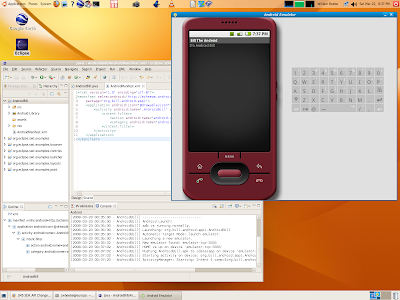
It's been a while since I played with Google's Android SDK (and I do mean play), so after after it surfaced recently in the tech press I decided to crank it back up and see what was different. So I downloaded the latest Eclipse release (3.3.2) and the latest Android SDK (M5 RC15), installed everything, and fired Eclipse IDE back up again. First, before you can use the SDK in the IDE you have to install the Eclipse Android plugins, which are at https://dl-ssl.google.com/android/eclipse. If you've worked any with Eclipse then you know you have to add the https address as a new remote site, then install all plugins found there. One of the two sets of plugins, the editors, requires the Eclipse WTP (Web Tools Platform) plugins as well, so when you go to install new features select the Google Android site as well as teh Europa Discovery Site. When you select both the Google entries the editors selection will have an error indicator. Click WTP. then the "Select Required...

Postcard from the edge

Image
This past Thanksgiving has been ... unique. I've spent a lot less time doing what I planned because of its uniqueness. Regardless, I managed to tinker a bit with some of the latest offerings. NetBeans 6 RC2 RC2 was released right before Thanksgiving. I've got it installed on Windows XP 2 (algol) and Ubuntu 7.10 (europa, shown below). On algol, with its 2GHz Core Duo processor, RC2 runs smooth as silk. It should considering the processing horsepower. On europa, with its single-core 2GHz Athlon XP, it runs a little rougher, especially at startup. To make the NetBeaners feel a little better, Eclipse 3.3.1.1 has the same problem on europa (see below). It takes about 20 seconds after the main window has appeared for responsiveness to be useful. And this only occurs the first time you start it up. Of course, for many people such as myself, you start it and leave it running for long periods lasting days at a time. Regardless of the initial startup lethargy, RC2 shows considerable poli...

CORRECTION: NetBeans 6RC1 has serious performance issues on Ubuntu 7.10

In the earlier post I reported that NetBeans 6RC1 had serious performance problems. After installing the latest ATI graphics driver and disabling XGL, NetBeans' performance was enhanced to levels seen in the past with older releases and is now quite acceptable. My only comment (and concern) is how XGL could have had such an adverse impact on NetBeans' performance. Again, as I mentioned in the earlier post, Eclipse 3.3.1.1 did not have this performance problem. I hope it isn't due to the fact that NetBeans depends on JFC while Eclipse uses its own widget toolkit, SWT. I did run some of the simpler JFC examples from the JDK (SwingSet2 and Java2D) and found no performance issues running them. I wonder what special features NetBeans is now using from Java that might cause this?

NetBeans 6RC1 has serious performance issues on Ubuntu 7.10

Image
I've been running Ubuntu 7.10 on europa, with basic 3D hardware acceleration via the native ATI drivers and some of the eye candy turned on. I have been pleased with just about everything except where noted. I decided to install the latest NetBeans 6 release, RC1. I downloaded it and installed it, and then fired 'er up. The first thing I noticed was the performance. It is, in a word, abysmal. It starts up slow and it runs slow. And I do mean slow. Up to this point developer releases of NetBeans 6 have not had such drastic performance slowdowns. And this performance slowdown is only observable on Ubuntu 7.10. NetBeans 6RC1 runs just fine on Windows XP SP2. The problem presented an interesting opportunity to compare NetBeans 6 RC1 with the version available on Ubuntu via Synaptic, NetBeans 5.5.1. Using Synaptic I found and installed that (current) version of NetBeans and started it up. The screen shot shows both running on the desktop. Version 6 RC1 is on top and version 5.5.1 i...

Ubuntu 7.10: Visual Effects interfere with OpenGL

I've discovered that I can have visual effects on europa identical to what I now experience with rhea and its Ubuntu installation, or I can have OpenGL functionality, but not both. Normal visual effects and OpenGL work fine together on rhea. The difference between europa and rhea is that europa has an ATI graphics card (9700Pro) while rhea has an nVidia graphics card (7600GT). Both have the respective "restricted" drivers installed. And it's the drivers that make the difference. I was able to enable graphics effects on europa by installing xserver_xgl via Synaptic. Once installed, I restarted the X server, logged back in, and was able to select normal visual effects. And it worked. Unfortunately Google Earth hung at the splash screen, glxgears emitted warning messages, fgl_glxgears refused to run, and WorldWind-based Java projects refused to execute properly either. So, in the end, I uninstalled xerver_xgl and went back to plain old (none) visual effects. Which, frank...

Ubuntu 7.10 beta replaces openSUSE 10.3 GM

I finally followed through my on my threat to replace openSUSE with Ubuntu. I've replaced openSUSE 10.3 GM with Ubuntu 7.10 Beta 1. Based on my experiences with both on my machines, I consider Ubuntu 7.10, even though it is still in beta, to be the better of the two distributions. I tried to do this once before with openSUSE 10.2 and Ubuntu 7.04. In the end I went back to openSUSE 10.2 and stayed there until now. This time the transition is considerably different, and considerably smoother. A lot of the ease of transition can be attributed to both distributions using Gnome 2.20, and to how I went about switching from openSUSE to Ubuntu. Upgrading openSUSE The first (un)planned step in migrating from openSUSE to Ubuntu was a planned step to migrate from openSUSE 10.2 to openSUSE 10.3. I had every intention of upgrading when 10.3 came out, and to start that migration I installed openSUSE 10.3 RC1 on europa. I wasn't particularly pleased with how it occurred. There were issues ...

Ubuntu 7.04 upgrades to Ubuntu 7.10

In between chores around the house (wash, mowing, cleaning, shopping, and walking Max) I upgraded rhea from Ubuntu 7.04 to 7.10. I used the method documented on the Gutsy Gibbon page. It was almost totally automatic. I had to come back to the computer between tasks to answer a few dialogs asking questions along the way. The questions themselves were simple and straightforward. When the upgrade was finished the system was running Ubuntu 7.10 Beta 1. First, the good news. It was unbelievable that the system upgraded and ran at all, let alone exactly as I had configured it before the upgrade. After reading one horror story after another in various fora about how Ubuntu upgrades had failed, I wasn't sure how it would all finish. But finish it did. Java is up to Java 6 Update 3. I had to check both synaptic as well as 'java -version' just to be sure. This is one upgrade higher than what is available from Sun's site itself. Furthermore, NetBeans 6 Beta 1 ran with the earlier...

NetBeans 6 Beta 1 running on a constrained system

Image
In an earlier post dinesh left a comment complaining about the poor performance of NetBeans 6 on his system as compared to earlier versions. This led me to upgrade my version rhea, the Ubuntu 7.04 test system, to NetBeans 6 Beta 1 from Milestone 9. I also upgraded to Java 6 Upgrade 2. I then started NetBeans 6 and ran some simple tests to see how well it performed on the desktop. rhea has "only" 512MB of DRAM like dinesh's system. The processor is a single-core 32-bit Athlon XP 2500+ running at 1.8 GHz. dinesh's was a dual-core Pentium 4. Running NetBeans with Firefox is a mistake, especially if Firefox has been up for some time and has multiple tabs open. The keyboard response was horrible. This may be part of dinesh's issues with regards to performance. Of course running anything substantial with Firefox on this machine has been horrible, which is a shame. Once Firefox exited the response in NetBeans 6 was quite good. Even after restarting Firefox the response ...

openSUSE 10.3 RC1: More things are beginning to work

Image
As noted in earlier posts about using Java 6 Update 2 on openSUSE 10.3 with graphical applications, such as NetBeans , I've since discovered a second solution to the Java 6 problem. Use Java 6 Update 1 as provided via the restricted formats page . I've already documented how I did it (in two steps, naturally, instead of one). I should have checked to see if Java 6 U1 as provided by the community would have the same problem as Java 6 U2 downloaded from the Sun site, but I didn't. I automatically assumed that if Java 6 U2 had a problem, then so would the slightly older U1. If there is no pressing bug fixed in U2 that you have to have, then my advice would be to install U1 and to work with it. That keeps you from having to add the environment hack in order to get applications such as NetBeans 6 Beta 1 working. Update I have Eclipse 3.3 installed on this system as well as NetBeans, and Eclipse 3.3 runs as well with Java 6 Update 1 or Update 2. I believe this is possible beca...